


50,58 ₺ 17:20
KuzeyDC GPU Server

GPU Server

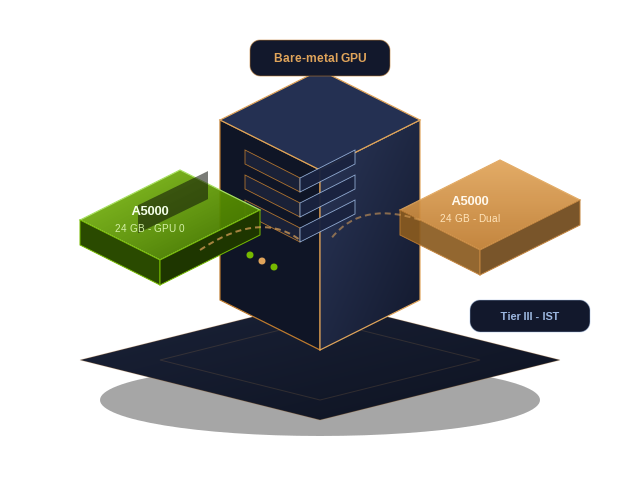
Bare-metal GPU for AI, LLMs and CUDA — RTX A5000 from $495/mo. Dual Xeon Gold 6138, 128 GB RAM, Tier III Istanbul.

  • NVIDIA RTX A5000
  • GTX / iGPU options
  • CUDA / AI ready
  • Tier III Istanbul
Browse GPU Plans

Professional AI and render on RTX A5000

NVIDIA Ampere architecture, 24 GB GDDR6 and high CUDA core counts for LLM inference, fine-tuning, image generation and 3D/VFX on the same bare-metal host. Dual Xeon Gold 6138 + 128 GB RAM keeps the CPU and memory path from starving the GPU.

  • 24 GB GDDR6 VRAM
  • 8192 CUDA cores
  • 2× Xeon Gold 6138
  • 128 GB System RAM

GPU Server plans

From entry iGPU/GTX to professional RTX A5000 — single and dual card stock.

GPU Starter

Emulators, light render and entry GPU work.

AMD Radeon Vega 7 (iGPU)

In stock

  • CPU AMD Ryzen 5 5600G
    6 Core / 12 Thread
  • RAM 32 GB DDR4
  • Disk 512 GB NVMe SSD
  • Network 20 TB · 1 Gbps

$84.99/mo

Buy Now
GPU Pro

CUDA-capable dedicated GPU server.

NVIDIA GeForce GTX 1070

In stock

  • CPU 2× Intel Xeon E5-2697 v2
    24 Core / 48 Thread
  • RAM 256 GB DDR3
  • Disk 500 GB NVMe
  • Network 20 TB · 1 Gbps

$200.00/mo

Buy Now

GPU A5000 #2

Same build — second ready server.

1× NVIDIA RTX A5000 24GB

2nd stock unit

  • CPU 2× Intel Xeon Gold 6138
    40 Core / 80 Thread
  • RAM 128 GB RAM
  • Disk 2× 960 GB SSD
  • Network 1 Gbps · Tier III

Get a Quote

Get a Quote
2× GPU

GPU A5000 Dual

Twin cards: parallel inference and multi-model.

2× NVIDIA RTX A5000 24GB

48 GB total VRAM

  • CPU 2× Intel Xeon Gold 6138
    40 Core / 80 Thread
  • RAM 128 GB RAM
  • Disk 2× 960 GB SSD
  • Network 1 Gbps · Tier III

Get a Quote

Get a Quote

GPU performance and comparison

Peak theoretical figures from vendor datasheets for the cards in our plans. Real LLM throughput depends on model, batch size and software.

Relative FP32 power (A5000 = 100)

  • Vega 7 ~1.7 TFLOPS
    6
  • GTX 1070 ~6.5 TFLOPS
    23
  • RTX A5000 27.8 TFLOPS
    100
  • 2× A5000 ~55.6 TFLOPS
    200
Spec Vega 7 (Starter) GTX 1070 (Pro) RTX A5000 2× A5000 Dual
Architecture GCN Vega (iGPU) Pascal Ampere Ampere ×2
VRAM System shared 8 GB GDDR5 24 GB GDDR6 ECC 48 GB total
CUDA / shaders 448 1,920 8,192 16,384
Tensor cores — — 256 512
RT cores — — 64 128
FP32 (peak) ~1.7 TFLOPS ~6.5 TFLOPS 27.8 TFLOPS ~55.6 TFLOPS
Tensor (sparsity) — — 222 TFLOPS ~444 TFLOPS
Memory bandwidth System-bound ~256 GB/s 768 GB/s ~1.5 TB/s
AI / LLM fit Entry / trials Light CUDA Pro AI Multi-model / batch
Typical work Emulators, light render CUDA, encode LLM, LoRA, SD Parallel inference

Sources: NVIDIA RTX A5000 datasheet · GTX 1070 public specs · AMD Vega 7 (Ryzen 5600G iGPU) theoretical FP32. Dual A5000 ≈ 2× single card (PCIe; NVLink optional).

Which card should you pick?

Starter · Vega 7

Budget entry: emulators and light imaging. Not enough VRAM/CUDA for modern LLMs.

Pro · GTX 1070

8 GB CUDA: encode, legacy CUDA, small experiments. No Tensor cores; tight for large LLMs.

A5000 · from $495

24 GB + Tensor: our main pick for LLM serving, LoRA, Stable Diffusion and pro render.

Dual A5000

48 GB and ~2× throughput: parallel models, wider batches or a busy production line.

How AI runs on GPU — end to end

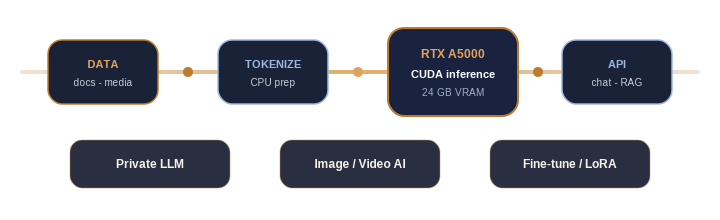
Large language models and image AI parallelize matrix math across thousands of CUDA cores. Data arrives, gets tokenized, inference runs on the A5000, then your API serves the result.

  1. 01

    Data & context

    Documents, chat history or media land on the server; RAG vector search is prepared on CPU/RAM.

  2. 02

    Model load

    Weights move into 24 GB GDDR6 VRAM. Quantization (INT8/INT4) fits larger models.

  3. 03

    CUDA inference

    Transformer layers run on the A5000; vLLM / TensorRT-LLM / Ollama speed up token generation.

  4. 04

    API & product

    Chatbot, assistant, image endpoint or internal tool — served from Turkey with low latency.

One card or two?

Same Xeon Gold 6138 chassis; the difference is GPU count.

1× RTX A5000

  • 24 GB GDDR6 VRAM
  • Single-model serving / fine-tune
  • Render and NVENC encode
  • From $495/mo · two units in stock

2× RTX A5000

  • 48 GB total VRAM
  • Two models in parallel or larger batches
  • Multi-GPU training / inference
  • For busy AI production lines

AI and GPU workloads

A5000 is a datacenter-class Ampere GPU — built for sustained CUDA, not gaming bursts. AI is not an add-on here; it is the primary reason to rent the box.

LLM inference & serving

Serve Llama, Mistral, Qwen, Phi and similar models with vLLM, TensorRT-LLM or Ollama. 24 GB VRAM fits 7B–13B comfortably; quantization opens 30B+ class. Ideal for private chat APIs, coding assistants or support bots.

RAG & enterprise knowledge

Index docs with embeddings + a vector DB so the LLM answers only from your data. Everything stays on your bare-metal host in Turkey — not on a public LLM cloud.

Fine-tuning & LoRA

LoRA / QLoRA with PyTorch + Hugging Face. Brand voice, industry jargon or internal workflows. On Dual A5000 run two jobs in parallel or use wider batches.

Image & video AI

Stable Diffusion, ComfyUI, Automatic1111, ControlNet; NVENC for encode. Continuous render queues for agencies and product teams.

3D, CAD & simulation

RT cores and 24 GB memory for Blender, Octane, V-Ray, engineering visualization and GPU-backed simulation.

CUDA compute & ETL

Custom CUDA kernels, scientific compute, image processing, OCR pipelines and GPU-accelerated data prep.

Moving your AI project onto GPU

Predictable monthly bare-metal instead of metered cloud GPU bills.

  1. 01

    Pick the workload

    LLM serving, fine-tune, image gen or CUDA compute — which dominates?

  2. 02

    Size the VRAM

    7B–13B on a single A5000; Dual for parallel models or wider batches.

  3. 03

    Install your stack

    NVIDIA driver, CUDA, Docker, vLLM/Ollama or Diffusers — you get root.

  4. 04

    Go to production

    Publish over AS62425 with low Turkey RTT; NOC is ready 24/7.

AI stack you can install

You get root — pick drivers and frameworks yourself.

  • NVIDIA Driver + CUDA Toolkit
  • PyTorch / TensorFlow
  • vLLM · TensorRT-LLM · Ollama
  • Hugging Face · Diffusers · ComfyUI
  • Docker · NVIDIA Container Toolkit
  • LangChain · LlamaIndex · RAG
  • JupyterLab · VS Code Server
  • Whisper · TTS · OCR pipeline

What you use AI for

What is a GPU Server for? Typical AI scenarios — all in Tier III Istanbul, data on your machine.

Enterprise LLM & chatbot

Staff assistant, IT helpdesk bot or customer-support LLM. Prompts and answers stay in-house; residency and policy stay yours.

RAG over company knowledge

Index PDFs, wikis and tickets; ground answers in approved sources only. Less hallucination, fresher knowledge.

Content & media AI

Product shots, ad creatives, video frames and batch encode. A 24/7 production line for agencies and ecommerce.

Custom model fine-tune

LoRA for industry jargon, brand tone or internal workflows. Trial cost is not tied to hourly cloud GPU meters.

Code & developer AI

Private code completion, review assistants or in-house Copilot-style services — without sending source to a public LLM.

R&D and POCs

Model benchmarks, prototypes and academic trials. Fixed monthly pricing keeps long CUDA jobs predictable.

Why KuzeyDC GPU?

The card alone is not enough — power, cooling, PCIe and network matter.

Tier III cooling

Redundant power and cooling sized for sustained CUDA load.

Dual Xeon Gold

40C/80T so tokenization and data prep do not stall the GPU.

AS62425 backbone

Low Turkey RTT for serving model APIs locally.

24/7 NOC

Fast hardware response and remote hands when needed.

Frequently asked questions

What AI work fits RTX A5000?

24 GB VRAM suits LLM inference (especially 7B–13B and quantized larger models), RAG pipelines, LoRA fine-tune, Stable Diffusion / ComfyUI, CUDA compute and professional render. Dual packs give 48 GB total for parallel jobs or wider batches.

How much is the A5000 starter pack?

Single-GPU A5000 #1 starts at $495/mo (2× Xeon Gold 6138, 128 GB RAM, 2×960 GB SSD, 1× RTX A5000 24GB). The second stock unit and Dual configs are quoted separately.

Why are there two single-GPU A5000 plans?

Two physical servers with the same build (Xeon Gold 6138 Dual, 128 GB RAM, 2×960 GB SSD, 1× A5000) are in stock. The second plan is the second ready unit.

Does Dual A5000 include NVLink?

The Dual pack runs two GPUs over PCIe. You can set up data-parallel or model-parallel workflows in your framework; NVLink needs are discussed separately.

Which software can I install?

You get root. Install NVIDIA drivers, CUDA toolkit, Docker + NVIDIA Container Toolkit, PyTorch/TensorFlow, vLLM, Ollama, LangChain and your preferred stack under your responsibility.

Why dedicated A5000 instead of cloud GPU?

Fixed monthly cost, unshared PCIe/VRAM, data residency in Turkey and predictable performance for long-running CUDA / AI jobs. Hourly cloud GPU bills climb fast on continuous inference or training.

Start AI on A5000

Single-GPU starter from $495/mo · 2 units in stock. Write us for Dual A5000 or a custom AI stack.

Order / Quote